
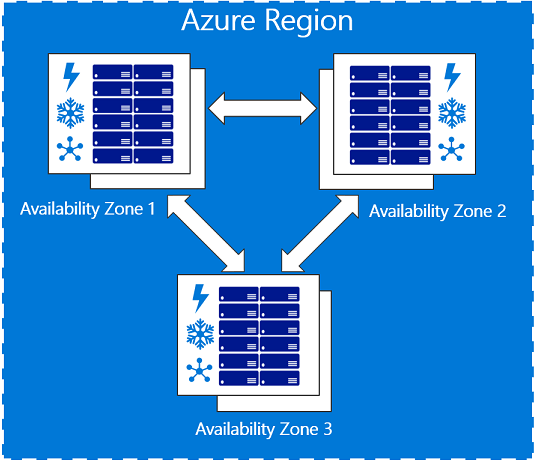
Azure Availability Zones is a high-availability offering that protects your applications and data from datacenter failures. Availability Zones are unique physical locations within an Azure region. Each zone is made up of one or more datacenters equipped with independent power, cooling, and networking.
This offering was recently introduced and many of the resources already deployed in Azure are not taking advantage of Availability Zones. There are good reasons for leveraging it though. Firstly uptime SLA is significantly increased for resources deployed across zones. VM uptime SLA for example when two or more VMs are deployed across two or more Availability Zones within an Azure region goes up to 99.99%. But also there are resources which require your VMs to be Zone specific, like for example Azure Ultra Disks.
Unfortunately there isn’t an built-in way of moving your resources into Zones. You can however script your way out to move a VM in a specific zone. The following powershell script for example
- Stops the VM
- Snapshots and copies all of the disks to a particular zone
- Creates new Zone based disks in the specific zone
- Deletes the original VM
- Creates a new VM in the specified zone using the old ones configuration
- Attaches the zone based disks
- and finally attaches the NIC of the original VM
Note that there is no additional cost for virtual machines deployed in an Availability Zone. There are however additional inter-Availability Zone VM-to-VM data transfer charges.
Discover more from ksharp
Subscribe to get the latest posts sent to your email.




Great Article, appreciate the efforts in putting this together
looks like your script doesnt work anymore, you get the error
New-AzVM : Unable to deserialize the response.
At line:1 char:1
+ New-AzVM -ResourceGroupName $resourceGroup -Location $originalVM.Loca …
+ ~~~~~~~~~~~~~~~~~~~~~~~~~~~~~~~~~~~~~~~~~~~~~~~~~~~~~~~~~~~~~~~~~~~~~
+ CategoryInfo : CloseError: (:) [New-AzVM], SerializationException
+ FullyQualifiedErrorId : Microsoft.Azure.Commands.Compute.NewAzureVMCommand
This is actually pretty stupid on Microsoft’s part to not allow change or assignment of an Availability zone after a VM has been built.