
I guess most of you will know by now that ItPro|DevConnections is holding a lottery for two msdn subscriptions for all of those that took advantage of the early bird offer and subscribed for the event before the 30th of September.
Well, I was assigned to perform the lottery which is going to take place today. This got me thinking, What would be the easiest (don’t have time) and geekiest (after all it’s a tech event) way to perform this lottery? And then it stuck me “why don’t I try LightSwitch, it’ll probably take me 10 minutes to prepare a full blown application”? And so it did, here’s what I’ve done:
1. Get the Data
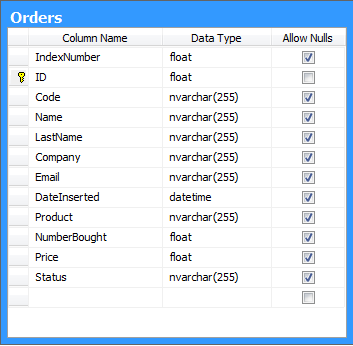 So first I needed the data, meaning the details (first name, last name, email etc.) of all of those that registered before the 30th of September. Luckily this year all the registrations went through a computerized system (that Techaholics made
  ) so it was very easy to extract all the data I needed, in a new table “Orders” in a new database.
The “Orders” table schema in the new database looked something like this.
2. Create LightSwitch Project
Next I created a new LightSwitch project using Visual Studio 2010 and the new template that you get when you install the LightSwitch framework. You can watch the video that I’ve made to see how I did it.

3. Randomly selecting a winner
The random selection logic that was put inside the button click handler was as shown in the video was:
Timer tm = null;
partial void Button_Execute()
{
  var orderList = this.OrderCollection.ToList();
  SetBorderColor(Colors.Black);

  if (tm == null)
  {
    tm = new Timer(new TimerCallback((callbackState) =>
      {
        var list = (List)callbackState;
        Random r = new Random((int)DateTime.Now.Ticks);
        var selectedindex = r.Next(list.Count);
        var winner = list[selectedindex];

        IContentItemProxy proxy = this.FindControl("txtWinner");
        proxy.Invoke(() =>
        {
          var txtWinner = (System.Windows.Controls.TextBox)proxy.Control;
          txtWinner.Text = string.Format("{0} {1} ({2})",
            winner.Name, winner.LastName, winner.Code);
        });

      }),
      orderList,
      TimeSpan.FromMilliseconds(0),
      TimeSpan.FromMilliseconds(100));
  }
  else
  {
    tm.Change(Timeout.Infinite, Timeout.Infinite);
    tm.Dispose();
    tm = null;
    SetBorderColor(Colors.Red);
  }
}
DISCLAIMERS!!
- None of the selected winners in the above video are the real ones. Winners will be picked later today and officially announced at www.itprodevconnections.gr
- I don’t guarantee that the winner selection will be made using this application. I just made this one for fun – to explore LightSwitch.
- The data shown on the screencast are sample data and were deleted once the sample was completed
Discover more from ksharp
Subscribe to get the latest posts sent to your email.

